

Configuring Webhooks
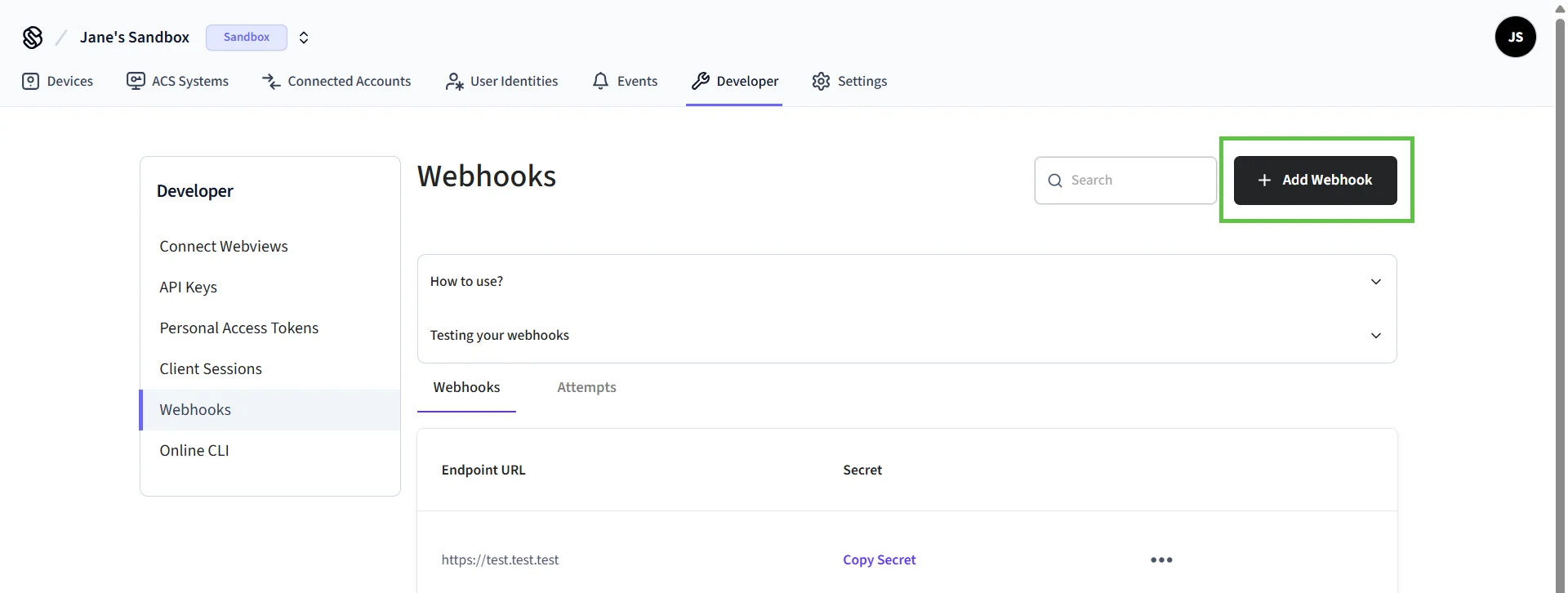
You can configure endpoints in each workspace for an app to receive webhook event notifications for resources, such as devices and connected accounts. To configure webhook endpoints:- In the left navigation pane of the Seam Console, click Webhooks.
- Click + Add Webhook.
- In the Create Webhook dialog, type your webhook URL and select the event types for which you want to receive events.
- Click Create.
- Copy your webhook secret and store it somewhere secure. You use this webhook secret to validate the payloads that you receive on your webhook.
device.connected or device.low_battery. It’s a good idea when getting started with webhooks to review the list of webhook event types and test your endpoint using the Svix sandbox environment.
.png?fit=max&auto=format&n=mXdNOM772968Xhc1&q=85&s=8f808dfdbebeb7d4b81719a7571781c2)
.png?fit=max&auto=format&n=mXdNOM772968Xhc1&q=85&s=447d12957375cadc0e14c9c5ea12651e)
Testing Events
Use the webhooks playground in Seam Console to see the payload for each event and test these events against your own endpoints.Retry Schedule for Webhooks
Seam delivers each webhook event based on a retry schedule with exponential backoff. Each message is attempted based on the following schedule, where each period is started following the failure of the preceding attempt:- Immediately
- 5 seconds
- 5 minutes
- 30 minutes
- 2 hours
- 5 hours
- 10 hours
- 10 hours (in addition to the previous)